 Back to Articles listing
AutoCAD vs SolidWorks: Best Choice for Mechanical Engineers
- February 6, 2026
- Read time unavailable
- By - MiT

As a student or professional entering either the design or engineering field, one of the first questions you will encounter is AutoCAD vs SolidWorks; both of these programs are utilized extensively in the industry and both provide excellent job opportunities. Yet, each serves a different purpose and knowing their individual strengths will help you make a more informed decision about your choice of program.
When discussing AutoCAD vs SolidWorks, the focus should be on identifying which program is best suited to your needs now and into the future. Both tools have usable elements and both have increased demand across various industries.Understanding AutoCAD
AutoCAD is a popular drafting software tool that is broadly used around the globe. It is drawing two-dimensional drawings and making simple three-dimensional models, as well as drafting architectural, civil engineering, electrical design and mechanical design.Professionals use AutoCAD for:
- Drawings for floor plans and building designs
- Drawings of electrical schematics
- Drawings of mechanical parts
- Drawings of infrastructure and civil projects
Understanding SolidWorks
SolidWorks is a parametric modelling software that provides 3D modelling and is primarily used by product designers and engineers within the manufacturing, automotive, aerospace and development industries.SolidWorks is well known for:
- Advanced 3D models
- The ability to create assemblies
- Ability to simulate motion
- Product visualization

AutoCAD vs SolidWorks: Key Differences
The comparison between AutoCAD vs SolidWorks becomes clearer when we look at their core functions.| Feature | AutoCAD | SolidWorks |
| Main Purpose | Drafting and 2D design | 3D mechanical modeling |
| Industry Use | Architecture, civil, electrical, mechanical | Manufacturing, product design, automotive |
| Learning Curve | Easier for beginners | Slightly more advanced |
| Modeling Style | Direct drafting | Parametric modeling |
| Assemblies | Limited | Advanced assembly tools |
| Simulation | Basic | Advanced simulation tools |
Salary in AutoCAD
In AutoCAD vs SolidWorks comparison it depends on many factors such as the industry you work in and your experience. The demand for AutoCAD professionals can be found mostly within the construction, architecture and engineering sectors.- Freshers – approximately ₹1.8 – ₹3.0 lacs per year
- Mid level professionals – approximately ₹3.5 – ₹6.0 lacs per year
- Experienced designers – approximately ₹7 lacs or more per year
Salary in SolidWorks
While comparing AutoCAD vs SolidWorks, SolidWorks jobs typically involve manufacturing and product design jobs, which may offer slightly higher pay in some sectors.- Freshers -approximately ₹2.5-₹4.0 lacs per year
- Mid level professionals- approximately ₹4.0-₹8.0 lacs per year
- Experienced designers – approximately ₹9.0 lacs per year
AutoCAD vs SolidWorks Career Opportunities
In the AutoCAD vs SolidWorks comparison, you will find that each software program opens up different career opportunities.Types of Careers in AutoCAD:
- Architectural Drafter
- Civil CAD Designer
- Electrical Designer
- Interior Layout Designer
Types of Careers in SolidWorks:
- Mechanical Designer
- Product Developer
- Tool and Die Designer
- Industrial Designer
Which One Should You Choose
In the AutoCAD vs SolidWorks decision, the right choice depends on your career goals.Choose AutoCAD for:
- A career in architecture or civil engineering
- Drafting and layout design
- A versatile, multi-industry tool
Choose SolidWorks for:
- A career in mechanical or product design
- Enjoying 3D modeling as a creative outlet
- Manufacturing and automotive industry interests
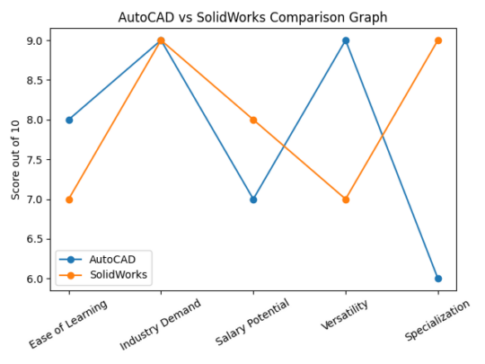
AutoCAD vs SolidWorks Visual Comparison Graph
This graph visually compares AutoCAD and SolidWorks strengths in key areas, including: Ease of Learning, Demand, Salary Potential, Versatility, and Specialization.
 Preview Changes (opens in a new tab)
Conclusion
In the comparison of AutoCAD vs SolidWorks, the discussion is about what fits your needs. AutoCAD offers versatility and strong demand for all industries, and SolidWorks offers advanced 3D design capabilities for product design careers.
In AutoCAD vs SolidWorks comparison, both programs are equally important in the design field; therefore, learning either program will provide you with a successful, rewarding career.Share this on
-

-

-

Recent Articles
-

Navisworks Course Training: Fees, Syllabus & Certification
-

Top CAD Interview Questions Freshers Must Prepare for Jobs
-

Structural Design Course in Thane: Software & Career Guide
-

SolidWorks vs NX: Key Differences Every Engineer Should Know
Archive posts
-
September2026
-
August2026
-
July2026
-
June2026
-
May2026
-
April2026
-
March2026
-
February2026
-
January2026
-
December2025
-
November2025
-
October2025
-
September2025
-
August2025
-
July2025
-
June2025
-
May2025
-
April2025
-
March2025
-
January2025
-
September2024
-
August2024
-
July2024
-
June2024
-
May2024
-
April2024
-
March2024
-
February2024
-
January2024
-
September2023
-
December2022
-
September2022
