 Back to Articles listing
Navisworks Course Training: Fees, Syllabus & Certification
- September 19, 2026
- 3 Min
- By - MiT
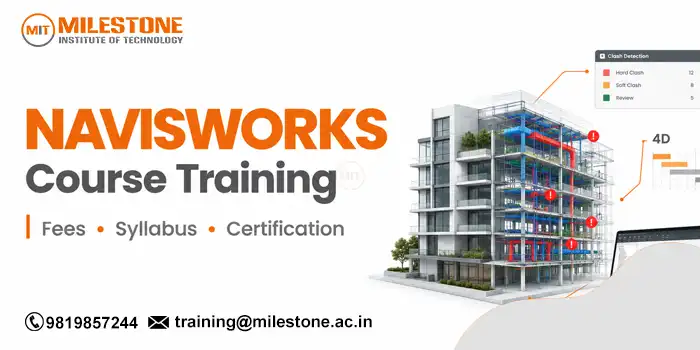
Navisworks is used in reviewing, coordinating, and managing complex building and infrastructure projects. It allows architects and designers to integrate models from different disciplines into one environment, identify coordination issues, review project information, and improve communication between team members. For students or working professionals looking for practical knowledge of projec.t coordination, Navisworks Course Training may be an opportunity to develop industry specific skills.
Choosing navisworks course training is not just about learning software commands. Learning how the software is used in real-world project workflows, such as model aggregation and navigation, to clash detection, quantification, viewpoints, and coordination reports, is also important, making learning more tangible to students with backgrounds in architecture, civil engineering, mechanical design, BIM, and construction.
What Is Navisworks?
Autodesk Navisworks is a project review and coordination software used to create building information models and other design data. It can combine files from different departments so multiple teams can review a model of a coordinated project in one place.
For example, an architectural model, a structure model, and a MEP model can be combined for a review. Teams can look at the model together, look for conflicts, make suggestions, measure elements, and communicate issues before construction begins.
This is why Navisworks Course Training is relevant to those who want to understand BIM coordination, and not just individual design software.Why Learn Navisworks?
Modern construction and engineering projects involve information from several teams. The coordination professional needs to understand the interaction of the models involved in the project and what design issues should be identified before they cause problems on the job site.A structured Navisworks Course Training program can help learners develop skills in:
- Combining models from different disciplines
- Navigating and reviewing 3D project models
- Understanding clash detection workflows
- Creating and managing viewpoints
- Using sectioning and measurement tools
- Preparing coordination reports
- Reviewing model information
- Supporting BIM coordination processes
Navisworks Course Training Syllabus
The syllabus may vary across the institutes, but a practical Navisworks Course Training will usually cover the following topics.1. Introduction to Navisworks
The user interface, navigation tools, project environment, file management, and basic model review are first introduced in this section. This section provides the information needed in the later coordination activities.2. File Import and Model Coordination
Students learn how to bring models and files into Navisworks, and how to combine information for project review. This training can introduce concepts of organizing models and working with multiple disciplines.3. Model Navigation and Review
This module focuses on selecting objects, identifying viewpoints, controlling visibility, searching for model elements, and working with models in large projects. Learners practice reviewing models from different angles and locations.4. Clash Detection
Clash detection is one of the most important parts of Navisworks Course Training. Students learn how to create clash tests, choose model groups relevant for clash testing, review group clashes, and the difference between a meaningful coordination problem and an acceptable situation.5. Clash Review and Reporting
After identifying clashes, learner’s need to understand how to review and communicate them. For example, training could cover clash status, comments, opinions, reports, and coordination workflows to help teams track issues.6. Measurement and Quantification
Navisworks provides tools for measuring and reviewing quantities of model components. Learners can practice the basic measurement workflows and learn about modeling information as it is used in project planning and review.7. Timeliner and Project Simulation
Timeliner can be used to link model elements with project schedules. Students will learn basic concepts of project simulation, and how model planning can be used to visualize projects more effectively.8. Practical Project
A useful Navisworks Course Training program should include a project where students work with the architectural, structural, and MEP models, conduct coordination checks, identify clashes, prepare reports, and present their findings.

Navisworks Course Training Fees
The Navisworks Course Training Fees in India range between 10,000 and 30,000, depending on the institute, course length, training model, syllabus, and level of practical training provided. Short term basic training may be priced at the lower end, while advanced training, such as clash detection, BIM coordination, project simulation, reporting, and projects may cost more.
Here are some indicative fees for training in India, which may differ between the training institutes. Check whether the fee includes practical sessions, study material, assessments, certification, project work, and trainer support.Navisworks Certification
Certification is the documentation that confirms you have completed training or passed an assessment. But, students should know the difference between a course certificate from the institute and an Autodesk certification.
If an institute gives you a certificate after completing Navisworks Course Training, check what the certificate represents, whether there is an assessment, and whether the certificate clearly states the course and training provider.
Practical skills remain important for professionals in BIM roles. A certificate that is supported by project experience, a portfolio, and knowledge of coordination workflows are valuable.Career Opportunities After Training
Navisworks skills are applicable to roles where model review and coordination are part of the work flow. This includes, among others, the title of BIM Modeler, BIM Coordinator, BIM Engineer, Design Coordinator, MEP Coordinator, or Construction Planning professional, depending upon education and experience.
A Navisworks certification is not a guarantee of employment. Employers may also require knowledge of Revit, AutoCAD, design tools specific to your discipline, BIM standards, drawings, project documentation, or coordination.Conclusion
Navisworks is particularly important when managing BIM coordination, as it allows you to review multiple models of the same project in one environment, and features such as clash detection, construction simulation, and clash quantification. Autodesk’s current Navisworks documentation includes models for review, construction simulation, clash quantification, and clash detection tools.
The right Navisworks Course Training should cover both software and project management. When comparing fees and certification, check course length, syllabus, hands-on experience, assessment, support, and type of certificate offered.
For students and working professionals, the strongest learning approach is to build practical confidence while understanding how Navisworks fits into the wider BIM workflow. That combination can make the software skill more useful for academic projects, portfolios, interviews, and professional coordination tasks.Frequently Asked Questions
1. What is Navisworks Course Training?
- Navisworks Course Training teaches students to review models, combine project files, identify clashes, create reports, measure elements, and support BIM coordination workflows.
2. How much does Navisworks Course Training cost?
- Fees vary by institute, duration, course level, training format, and practical coverage. Before comparing prices, it is best to check the syllabus and including items.
3. Is certification provided after Navisworks training?
- Many training institutes offer their learners a certificate for completing the courses. Before enroling for a course, learner should make sure they know the details of the certificate and the assessment process.
4. Who should join Navisworks Course Training?
- This course is ideal for civil, architecture, BIM, MEP, structural, construction, CAD, and design students seeking to develop model coordination skills.
Share this on
-

-

-

Recent Articles
-

Top CAD Interview Questions Freshers Must Prepare for Jobs
-
Structural Design Course in Thane: Software & Career Guide
-

SolidWorks vs NX: Key Differences Every Engineer Should Know
-

AI in Mechanical Design: How AI Is Transforming Engineering
Archive posts
-
September2026
-
August2026
-
July2026
-
June2026
-
May2026
-
April2026
-
March2026
-
February2026
-
January2026
-
December2025
-
November2025
-
October2025
-
September2025
-
August2025
-
July2025
-
June2025
-
May2025
-
April2025
-
March2025
-
January2025
-
September2024
-
August2024
-
July2024
-
June2024
-
May2024
-
April2024
-
March2024
-
February2024
-
January2024
-
September2023
-
December2022
-
September2022
