 Back to Articles listing
What Should You Know Before Choosing CAD Design Jobs?
- October 3, 2026
- Read time unavailable
- By - MiT
What Should You Know Before Choosing CAD Design Jobs?
Computer aided design careers can lead to openings in mechanical engineering, civil engineering, architecture, manufacturing, product development, construction, and many other fields. But getting started with the career can take more than learning one software or applying for a position.
Before you choose CAD Design Jobs, make sure you know what employers want from you, in which industries you can work, what software you will be using, how important projects are, and how your career can progress.
For students and freshers, the right preparation can make all the difference between knowing how CAD software works and being ready to tackle real design projects.What Are CAD Design Jobs?
CAD Design Jobs involve creating, editing, analyzing, and documenting digital drawings and 3D models using computer-aided design software.
A CAD professional may also create a machine component, building plan, product model, structural drawing, assembly, electrical layout, or manufacturing drawing depending on the industry.
For example, a mechanical CAD designer might build a 3D model of a machine part in SolidWorks, while a civil designer may design detailed drawings in AutoCAD or BIM software like Revit.
The field of CAD has many careers. Depending on your education, software knowledge, work experience, and other skills, you may choose a job that fits your interests best.1. Understand Which CAD Field Interests You
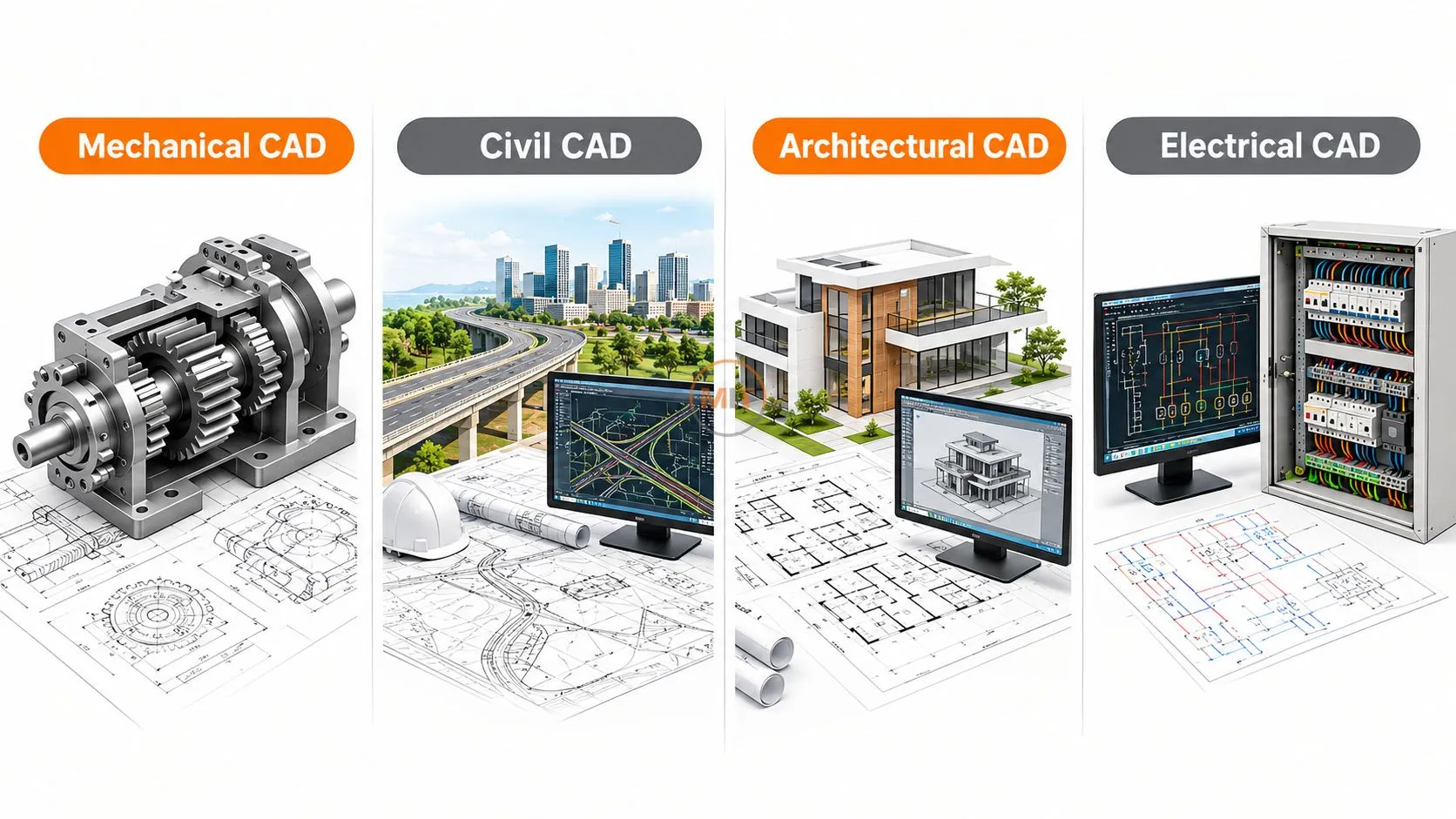
Be sure to narrow down your field of interest in advance.Mechanical CAD
Mechanical designers build components, machines, assemblies, tools, and products using AutoCAD, SolidWorks, CATIA, Creo, NX, and Autodesk Inventor.Civil CAD
Civil designers may work on site layouts, infrastructure drawings, structural plans, road projects, and construction documents using AutoCAD, Civil 3D, Revit, STAAD.Pro, and other engineering tools.Architectural CAD
Floor plans, elevations, sections, 3D models and building documentation are all used by architects. These areas are in AutoCAD, Revit, SketchUp and 3ds Max.Electrical CAD
Electrical CAD professionals can work on electrical layouts, control panels, wiring diagrams, and other industrial documentation. Tools such as AutoCAD Electrical or EPLAN may be used.
Knowing your field of interest will allow you to avoid learning software by chance.
2. Software Knowledge Is Important, But It Is Not Enough
One of the common mistakes beginners make is to think that knowing the buttons and commands of CAD software automatically makes them job-ready.
Employers are looking for people who can read and understand drawings, follow design guidelines, read dimensions, identify design requirements, and accurately document their work.
For example, knowing how to create a 3D model is useful, but understanding why you need a certain dimension, tolerance, material, or manufacturing method is more practical.
For CAD Design Jobs, it is important to know the relationship between software commands and engineering or design work.3. Learn Industry Relevant Software
The software you learn should be suited to your particular industry.
A mechanical design student might consider learning AutoCAD in addition to SolidWorks, CATIA, Creo, or NX.
An architecture student may also benefit from AutoCAD, Revit, SketchUp, and visualization software.
Civil engineering students may use AutoCAD, Revit Structure, Civil 3D, STAAD.Pro, or other BIM software.
You do not need to know everything about each software package. It is best to learn as much as you can about the ones that will be useful for your specific job.
4. Practical Projects Can Strengthen Your Profile
One of the best ways to prepare for CAD Design Jobs is to work on practical projects.
A certificate shows that you attended training. A project shows you have applied your knowledge.
For example, a mechanical student could create:
- A machine component
- A gearbox assembly
- A sheet metal enclosure
- A mechanical part with manufacturing drawings
- A complete product assembly
An architecture student could prepare:
- A residential floor plan
- Building elevations
- A 3D building model
- Interior layouts
- A basic BIM project
5. Understand Engineering Drawings
Technical Drawing Knowledge is the foundation of many CAD Design Jobs.You should understand concepts such as:
- Orthographic views
- Sectional views
- Isometric views
- Dimensions
- Tolerances
- Scale
- Drawing symbols
- Layers
- Line types
- Annotations
- Title blocks
6. Develop Accuracy and Attention to Detail
CAD work requires precision.
Little mistakes in dimension, hole location, material specification, layer, or drawing annotation can make or break a project later in manufacturing or construction.
That is why, people who are thinking of applying for CAD Design Jobs should check their work before sending it in.
Write a simple checklist for every project:
Dimensions → Layers → Scale → Views → Annotations → File naming → Final review
This habit can be valuable both in training and at work.7. Communication Skills Also Matter
Some CAD professionals work in collaboration with others.
They communicate with engineers, architects, project managers, production teams, clients, contractors, or other designers.
You may need to understand design instructions, ask questions about unclear requirements, explain changes, and communicate technical information.
So communication skills can be used alongside CAD skills.
Even if you are fresher, practice explaining your projects in simple language. In an interview, make sure you can explain what you designed, which software you used, what problems you faced, and how you solved them.

8. Know What Employers May Look For
While individual companies and jobs will have specific CAD Design Jobs needs, many may require certain skills.These can include:
- CAD software knowledge
- Engineering drawing fundamentals
- 2D drafting
- 3D modelling
- Assembly design
- Documentation
- Basic design standards
- Problem solving
- Attention to detail
- Communication
- Project experience
9. Certification Can Support Your Profile
Certification is useful when trying to get into the CAD industry, especially if it shows knowledge about a particular software or skill.
But, certification should enhance rather than replace experience.
Suppose two candidates are of similar educational background. One may only be able to describe the exercises taken during class time, while the other may show several projects he has completed, and explain the design decisions they made in the design process.
The second candidate may have more evidence of practical application.
Also, before applying for CAD Design Jobs, consider training, certification, and project work.10. Understand Career Growth
CAD may lead you to different design and engineering careers.
CAD beginner, junior designer, draughtsman or design engineer is a role a beginner may take depending on their qualifications and industry.
With experience, professionals may move toward roles such as:- CAD Designer
- Design Engineer
- Senior CAD Designer
- BIM Modeler
- Project Designer
- Product Designer
- Design Coordinator
- Engineering Specialist
11. Keep Learning as Technology Changes
Design is a constantly changing business. CAD-based processes continue to move into the domain of BIM, simulation, manufacturing, data management, visualization, and automation.
Professionals who learn a lot can adapt faster to changing work processes.
For example, a mechanical designer who starts off with 2D drafting might later go on to learn 3D modeling, assemblies, simulation, product development and manufacturing documentation.
As with the architect, the architectural professional may move from 2D drafting to BIM, 3D visualization, project coordination, and project documentation.
The most useful question is not just “Which software should I learn?”
Instead, ask:
“Which skills will help me solve real design problems?”A Simple Checklist Before Applying for CAD Design Jobs
Before applying, ask yourself:- Can I create accurate 2D drawings?
- Can I create and modify 3D models if my target role requires them?
- Can I understand technical drawings?
- Can I explain my projects confidently?
- Do I have a portfolio?
- Do I know the software mentioned in my target job descriptions?
- Can I identify and correct mistakes in my drawings?
Conclusion
CAD Design Jobs can give you an excellent head start to engineering, manufacturing, architecture, construction, or product development. But it takes more than memorizing program commands.
Build your skills in software, drawing techniques, project planning, accuracy, communication, and industry awareness.
Most importantly, apply your learning to projects. Do not just ask how many CAD commands you know; focus on what you can actually design, document, modify, and explain.
Google’s current guidelines for AI search emphasize useful, reliable, people first content and information beyond summaries. This is similar to how to research a career: look beyond job titles and figure out the skills, tools, responsibilities, and expectations associated with the job.Frequently Asked Questions
1. What qualifications are necessary for CAD Design Jobs?
Some organizations may require relevant engineering, architecture, or design education, as well as CAD software and project experience.2. What software can be used for CAD Design Jobs?
The software used depends on the industry. AutoCAD, SolidWorks, CATIA, Creo, NX, Revit, SketchUp, Civil 3D, and other software may be used.3. Can freshers apply for CAD Design Jobs?
Yes, freshers can apply for trainee or junior positions. They need to have a solid understanding of software, drawing, and a number of projects.4. Is a CAD certificate enough to get a job?
A certificate may be the perfect complement to your resume, but you may also need to show your practical skills, project experience, portfolio presentation and that you can show your knowledge.Share this on
-

-

-

Recent Articles
-
CATIA Surface Modeling: Design Complex 3D Shapes with Ease
-

Top Civil CAD Courses for Engineering, Design & BIM Careers
-

Navisworks Course Training: Fees, Syllabus & Certification
-

Top CAD Interview Questions Freshers Must Prepare for Jobs
Archive posts
-
October2026
-
September2026
-
August2026
-
July2026
-
June2026
-
May2026
-
April2026
-
March2026
-
February2026
-
January2026
-
December2025
-
November2025
-
October2025
-
September2025
-
August2025
-
July2025
-
June2025
-
May2025
-
April2025
-
March2025
-
January2025
-
September2024
-
August2024
-
July2024
-
June2024
-
May2024
-
April2024
-
March2024
-
February2024
-
January2024
-
September2023
-
December2022
-
September2022
