 Back to Articles listing
CATIA Surface Modeling: Design Complex 3D Shapes with Ease
- October 10, 2026
- 3 Min
- By - MiT
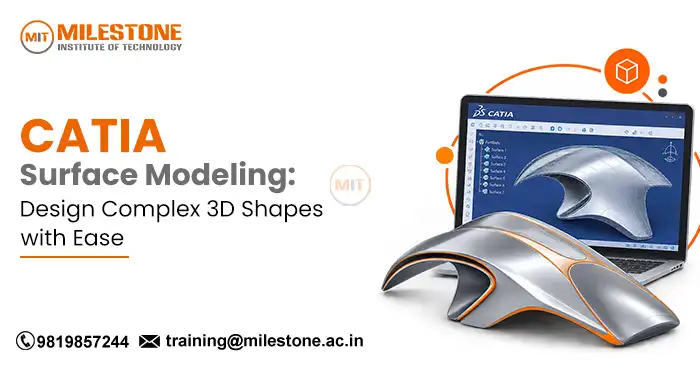
Modern product designs are about more than drawing simple 3D models. Many products, including cars, planes, and parts for consumer and industrial applications, feature smooth curves, flowing edges, and complex shapes. Designers need special tools to create these forms while still maintaining the appearance and performance desired. This is where CATIA Surface Modeling comes in.
CATIA is a computer aided design software used in areas such as automotive, aerospace, manufacturing, and product design. Surface design makes it possible for engineers and designers to create complicated geometries that may not be possible to model using traditional solid modeling tools.
Whether you are a mechanical engineering student, CAD designer, or a professional trying to improve your design skills, understanding surface modeling can help you explore advanced product design opportunities.What Is CATIA Surface Modeling?
CATIA Surface Modeling is a CAD technique used to create, modify, and refine three-dimensional shapes made from surface geometry. As opposed to solid modeling which focuses on creating closed volumes, surface modeling focuses more on the form and surface quality of an object.
Designers can create surfaces using curves, profiles, boundaries, and guide geometries. These surfaces can be joined, trimmed, extended, or connected to create a complete product shape.
A simple rectangular block can be designed with relatively simple solid modeling tools. But creating a car bonnet with a smooth curvature, an aircraft part with a sleek profile, or a product enclosure with ergonomic design could require advanced surfaces.
CATIA allows design professionals to directly control the shapes, curves, and transitions between surfaces in a product. This is valuable for products where appearance, aerodynamics, and geometry are important.Why Is Surface Modeling Important in Product Design?
Surface modeling is extremely important to designing products with complex outer shapes. Surface modeling allows designers greater control over the geometry and appearance of the part.1. Creates Complex Geometries
Many products in design today feature curved, irregular, or organic shapes. Surface modeling enables the designers to create these geometry with curves, boundaries, and controlled surfaces.
Examples include automotive exterior panels, aircraft fairings, plastic product housings, and consumer electronics.2. Improves Surface Smoothness
Smooth transitions are important in products such as vehicle bodies and aerodynamic components. With CATIA Surface Modeling, the designer can create the intersections of surfaces, as well as the continuity between these surfaces.
This minimizes the appearance of edges, irregularities, and abrupt changes in shape.3. Supports Better Design Visualization
Surface models provide a detailed visual representation of the exterior appearance of the product. Designers can evaluate its proportions, curves, and overall form before the product goes to manufacturing.
This makes it much easier to identify design problems early and to communicate ideas with engineering teams.4. Supports Product Development
A surface geometry can be used along with the solid model in product design. Designers may create an exterior shape, refine it, and use the resulting result via downstream operations to create a machinable part.
But, surface quality alone does not guarantee that a product is ready for production. Additional considerations including wall thickness, material properties, tolerances, tooling, and manufacturing requirements should also be taken into account.Key CATIA Surface Modeling Tools
Learning the tools is critical to having knowledge of the tools used in surface design. The tools used will differ depending on the version of CATIA and the workbench.1. Extrude
The Extrude tool creates a surface by extruding a selected profile in a specified direction. This tool can be used to create surfaces from lines, curves, and other appropriate profiles.
For example, a designer may extrude a curve for a simple surface that forms part of an enclosure or structural component.2. Revolve
Revolve creates a surface by rotating a profile around an axis. It is useful for components that have rotational geometry.
Design applications include curved decorative parts, rotating product features, and selected component profiles.3. Sweep
Sweep is used to create a surface by moving a profile along a guide curve. It is especially useful when forming curved forms that follow a path.
Designers can employ this method to create handles, ducts, trim and other products with flowing geometry.4. Loft
Loft creates a surface through multiple selected sections that help define how the shape changes over length.
For example, a designer can use different cross sections to design a curved housing for a product or an aircraft component with changing profile.5. Fill
Fill creates a surface within a closed boundary, if the selected geometry is compatible with the specifications of the tool. The filling tool is useful for closing gaps and completing parts of a surface model.
To get the desired results, a boundary should be properly defined.6. Join and Trim
Join is the process of connecting similar surface elements into a connected surface. Trim is the process of removing unwanted portions of surfaces using any intersections or other boundary.
Together, these operations allow designers to refine surfaces models and begin developing them.

Step by Step Process for Creating a Surface Model
A structured workflow makes complex design tasks easier to manage. Beginning CATIA Surface Modelers can use these guidelines to begin their CATIA Surface Modeling studies.Step 1: Study the Design Requirements
Start by understanding the shape and dimensions of the component, purpose, and requirements for manufacturing. Referencing drawings, sketches, and design images can provide an accurate understanding of the geometry of the component.Step 2: Create Reference Sketches and Curves
Create profiles, guide curves, and boundary curves. These references determine direction, proportion, and overall shape of the surface. Correct placement of the curves will ensure there are no unexpected intersections or gaps.Step 3: Build the Main Surfaces
Use a shaper like Extrude, Sweep, Loft or Fill to create the basic geometry of the model. Use tools according to the shape of the model, instead of using the same tool for each feature.Step 4: Refine the Geometry
Take advantage of cutting, joining or other suitable operations to remove excess material and join surfaces. Check for contact and shape.Step 5: Check Surface Continuity
Check for connection between adjacent surfaces. Depending on the design, the required connection could be a positional, tangential, or curvature continuity.
Smooth transitions are particularly important for visible exterior paneling or products that require extreme styling.Step 6: Validate the Model
Check for gaps, intersections, invalid geometry, and other design problems. If the model must be transformed into a solid, check that the surfaces can form a suitable closed boundary before doing closure or thickening.Step 7: Prepare the Final Design
Arrange your model, check the dimensions, and make sure the geometry fits the project requirements. Depending on what happens next, the model may be used for visualization, engineering review, or manufacturing preparation.Applications of CATIA Surface Modeling Across Industries
Automotive Industry
Automotive designers use surface modeling to design car exteriors, dashboards, bumpers, headlamp housings, and other complex contoured surfaces. Surface quality is important for the visual appearance as well as the aerodynamic performance of certain parts.Aerospace Industry
Aircraft parts need to be aerodynamically optimized. Surface design techniques provide an opportunity for creating fairings, aerodynamic covers, and other geometrical details.
Design is also critical to engineering, safety, and manufacturing specifications.Consumer Product Design
Mobile phone cases, appliances, furniture, and other wearable devices have a smooth exterior shape. Modeling the surface allows designers to try out different shapes while remaining in control of the design.Industrial Equipment
For example, industrial equipment may have curved covers, ducts, machine enclosures, and other specialized parts. Surface modeling can help create these shapes before using them to combine with other mechanical features.Skills Needed to Learn CATIA Surface Modeling
Learning the software is only part of being a good CAD designer. You also need to be able to quickly grasp the fundamentals of design.Important skills include:
- Engineering drawing: Make sense of dimensions, projections, sections, and design specifications.
- Geometry: Recognize how curves, profiles, boundaries, and surfaces interact.
- CAD basics: Learn sketching, reference geometry, part design, and feature management.
- Surface Quality Assessment: If the surface has gaps, transitions, or change in curve that you are not happy with, re-evaluate the surface.
- Problem solving: Correct failed operations and modify geometry without harming the model.
- Practice: Apply tools to practical components rather than relying only on demonstrations.
Career Opportunities After Learning Catia Surface Modeling
Knowledge of surface modeling can support career development in industries that require advanced CAD and product design skills. Depending on experience, qualifications, and additional technical knowledge, learners may explore roles such as:- CAD Designer
- CATIA Design Engineer
- Mechanical Design Engineer
- Product Design Engineer
- Automotive Design Support Professional
- Surface Design Specialist
Learn CATIA Surface Modeling at Milestone Institute of Technology
For students and aspiring designers, structured training may help them understand the complexities of CAD. Milestone Institute of Technology in Thane offers CAD training to students interested in mechanical design and related engineering areas.
Look for real-world training experiences that require actual focusing on specific exercises, individual training, and projects. A one to one training program can allow learners to spend more time with difficult tools, learn from mistakes, and continue learning at their own pace.
Practice creating curves, building surfaces, making transitions, and checking model quality. Developing these skills gradually may strengthen students foundation for more advanced CAD work.
Before registering, check out the course syllabus, the software, the opportunity for work-based projects, and the amount of training support provided. Knowing all of this will help you determine which training courses are right for you.Conclusion
CATIA Surface Modeling can be utilized to quickly design three dimensional forms with a precisely defined geometry and smooth transitions in complex automotive, aerospace, consumer product, and industrial design applications.
By learning Sweep, Loft, Fill, Join, and Trim, designers can learn to create more advanced surface models and understand how different geometries interact. Combining these skills with engineering basics and practice will boost design confidence and help designers advance in their careers.
As a beginner, I recommend starting with simple surfaces, practicing tools on each surface, and then working your way up to a product model. Practice on the software turn your software knowledge into useful design skills.Frequently Asked Questions
1. What is CATIA Surface Modeling used for?
It is widely used in automotive, aerospace and product housings, as well as industrial designs, to produce complex curves.2. Is surface modeling different from solid modeling?
Yes, surface modeling focuses on surface geometry while solid modeling creates enclosed three dimensional volumes.3. Is CATIA Surface Modeling difficult to learn?
Beginners can learn it step by step by learning curves, using basic tools, and working on guided projects.4. Which industries use CATIA surface modeling design?
Automotive, aerospace, consumer product design, and industrial equipment industries use surface design techniques.Share this on
-

-

-

Recent Articles
-

EPLAN Panel Design: Learn Electrical Schematics with Ease
-
What Should You Know Before Choosing CAD Design Jobs?
-
Top Civil CAD Courses for Engineering, Design & BIM Careers
-

Navisworks Course Training: Fees, Syllabus & Certification
Archive posts
-
October2026
-
September2026
-
August2026
-
July2026
-
June2026
-
May2026
-
April2026
-
March2026
-
February2026
-
January2026
-
December2025
-
November2025
-
October2025
-
September2025
-
August2025
-
July2025
-
June2025
-
May2025
-
April2025
-
March2025
-
January2025
-
September2024
-
August2024
-
July2024
-
June2024
-
May2024
-
April2024
-
March2024
-
February2024
-
January2024
-
September2023
-
December2022
-
September2022
